

Rank Math vs Yoast 2026: Which WordPress SEO Plugin Actually Wins?
Rank Math vs Yoast, this is the most heated debate in the WordPress SEO world right now.
Over 13 million WordPress sites still use Yoast SEO. But thousands of bloggers are quietly switching every single month.
I was one of them.
Here’s a stat that stopped me cold. Rank Math has 61.1k lines of code. Yoast has 97.1k. That’s nearly double the code for fewer features.
I started digging into the Yoast vs Rank Math debate, and the more I researched, the clearer the answer became. So I made the switch.
When comparing Rank Math SEO vs Yoast head-to-head, one thing stands out immediately. Rank Math gives you more schema, redirects, image SEO, and analytics, while Yoast charges extra for basics.
I’ve since upgraded to Rank Math Pro. It’s cheaper than Yoast Premium and does far more.
In this guide, I’ll break down Yoast SEO vs Rank Math across every major feature, speed, schema, image SEO, analytics, pricing, and more.
By the end, you’ll know exactly which plugin deserves a spot on your WordPress site.
Let’s get into it.
Table of Contents
What Is Rank Math SEO?
Rank Math launched in November 2018 and quickly became one of the fastest-growing WordPress SEO plugins ever.
The free version of Rank Math offers features most plugins charge for. Things like multi-keyword tracking, schema markup, and Google Search Console integration are all free.
Rank Math Pro unlocks even more, including advanced schema types, keyword rank tracking, and WooCommerce SEO. It’s honestly a lot of power packed into one plugin.
The plugin is best suited for beginners to advanced users who want full control. But beginners can use it too, thanks to its smart setup wizard.
Read our full Rank Math Review.
What Is Yoast SEO?
Yoast SEO launched in 2010 and basically defined what WordPress SEO plugins should look like. It has over 13+ million active installs and a rock-solid reputation.
The free version covers the basics well, including XML sitemaps, meta tags, readability analysis, and breadcrumbs. It’s simple, reliable, and trusted by millions.
Yoast Premium adds features like redirect management, multiple keyword optimization, and internal linking suggestions. But these features come at a higher price compared to Rank Math.
Yoast is best for beginners or users who want a plug-and-play solution. If you want simplicity over customization, Yoast is your plugin.
Why So Many WordPress Users Are Ditching Yoast for Rank Math
Yoast used to be the gold standard. Every WordPress tutorial, every YouTube video, every beginner guide pointed to Yoast.
Then it got bloated.
I ran the Query Monitor plugin on my site, and Yoast was one of the heaviest plugins loading on every single page. That’s a problem when you care about Core Web Vitals.
The ads inside the dashboard were another nightmare. You had to install a separate plugin, the Hide SEO Bloat plugin, just to clean up your own WordPress admin area. That’s a little ridiculous.
Yoast Premium costs $89 per year. But the “premium” features? Things like readability analysis and internal link suggestions. Stuff any experienced SEO person already does naturally.
Rank Math, on the other hand, includes a redirect manager for free. It auto-adds image alt text. It has 18 schema types built in. All of that is free.
It’s no surprise that Rank Math is now rated the #1 WordPress SEO plugin in most Facebook community polls.
Rank Math vs Yoast – Full Feature Comparison
Let’s put this side by side so you can see exactly what you’re getting.
I’ve covered the main differences in my Yoast vs. Rank Math comparison, but if you want a deeper breakdown, the complete feature comparison table gives you a clearer picture of how both plugins compare side by side. Rank Math stands out by offering several built-in features.
Comparison Table
| Feature | Rank Math Free | Yoast Free | Rank Math Pro | Yoast Premium |
|---|---|---|---|---|
| Keywords per post | 5 | 1 | Unlimited | 5 |
| Schema Markup | ✅ Advanced | ✅ Basic | ✅ Full | ✅ Limited |
| Redirect Manager | ✅ Yes | ❌ No | ✅ Yes | ✅ Yes |
| Google Search Console | ✅ Yes | ❌ No | ✅ Yes | ✅ Yes |
| 404 Monitor | ✅ Yes | ❌ No | ✅ Yes | ❌ No |
| WooCommerce SEO | ✅ Basic | ❌ No | ✅ Advanced | ✅ Yes |
| Internal Linking | ❌ No | ❌ No | ✅ Yes | ✅ Yes |
| Price (Annual) | Free | Free | $69/year | $99/year |
Yoast only provides these in its premium version or doesn’t offer them at all. These features include automatic image alt text generation, advanced schema controls, integrated analytics, and a more lightweight, performance-focused setup.

Rank Math free already beats Yoast free on almost every feature. That tells you a lot.

Both plugins are module-based. You can turn features on or off depending on what your site needs. This keeps things clean and lightweight.
The biggest win with Rank Math? It replaces multiple plugins at once. Redirects, image SEO, and schema are all handled in one plugin.
Rank Math vs Yoast – Speed & Performance
Rank Math is known for being lightweight and well-coded. In most speed tests, it adds minimal load to your site.
Yoast has 97.1k lines of code. Rank Math has 61.1k lines. The Rank Math plugin zip file is also about 3 times smaller than Yoast’s.
For anyone serious about WordPress speed, this matters a lot.
You can test this yourself using the Query Monitor plugin, which shows you exactly which plugins are adding load time on each page request. New Relic is another powerful tool for server-level plugin performance monitoring.
Page speed directly affects your Google rankings. Google’s Core Web Vitals update made that crystal clear.

Every heavy plugin you run is slowing down your site. Rank Math is simply the leaner option.
On top of that, Yoast fills your WordPress dashboard with ads. You need a separate plugin just to hide them. Rank Math doesn’t do this.
If you’re on shared hosting or running a content-heavy site, that performance difference matters. Every millisecond counts when Google is measuring your page experience.
Bottom line: If site speed matters to you, and it should, Rank Math is the better choice.
Rank Math vs Yoast – Schema Markup
Schema markup is one of the most powerful on-page SEO tools available right now. It tells Google exactly what your content is about and can unlock rich results in search.
Rank Math supports 18 Pre-defined Schema Types and 6 Extra Schema Types. These include Review, FAQ, HowTo, Video, Recipe, Course, Article, and more. Rank Math also supports 840+ Schema Types.

Yoast’s schema options are limited and honestly confusing to set up. I used a separate schema plugin when I was on Yoast just to fill the gap.
Here’s how schema works inside Rank Math. You edit a post, scroll down to the Rank Math meta box, and click on the Schema tab. You choose your schema type, fill in the required fields, and you’re done.

Rank Math also detects when you embed a video and automatically applies the Video schema. That’s one less thing to think about.
FAQs schema and the HowTo schema are especially valuable. They can generate rich results in Google that expand your search listing and push competitors down the page.
If schema is your priority — and it should be — Rank Math wins this category easily.
Rank Math vs Yoast – Image SEO
WordPress stopped automatically adding alt text to images a long time ago. Since then, it’s been a manual process – unless you use the right tool.
Rank Math automatically generates alt attributes using your image filename. So if you upload an image named “rank-math-vs-yoast-comparison.jpg,” Rank Math sets that as the alt text automatically.

This saves a massive amount of time. Especially if you’re publishing content with lots of images.
With Yoast, you either add alt text manually every time or install a separate image SEO plugin. That’s another plugin on your site, another potential conflict, another thing to maintain.
The best practice here is simple. Name your images descriptively before uploading them to WordPress. Use hyphens between words. Be specific about what the image shows.
Rank Math handles the rest automatically.
Rank Math vs Yoast – Analytics & Google Search Console Integration
Rank Math Pro includes a built-in analytics dashboard that pulls data directly from Google Search Console. This is a feature Yoast doesn’t offer at any price point.
Inside the dashboard, you’ll see red and green arrows next to each post. Green means your rankings or clicks improved. Red means they dropped.
Google Search Console alone doesn’t show you these trend indicators. You have to compare dates manually, which takes time.
Rank Math also shows a position history chart for individual posts. You can see at a glance whether a specific piece of content has been climbing or sliding in Google.
There is one trade-off. The analytics integration does add some additional code to your site. It’s a minor consideration, but worth knowing.

For bloggers managing 50, 100, or 200+ posts, this dashboard is a game-changer. You can spot declining content fast and take action before rankings tank.
Rank Math vs Yoast – Redirect Manager
A redirect manager is a basic, essential SEO tool. When you change a URL, you need a 301 redirect so Google and your visitors don’t hit a dead end.
Yoast makes you pay $89/year just to access this feature in Yoast Premium. That’s frustrating given how many free redirect plugins exist.
Rank Math includes the redirect manager completely free. No upgrade needed.

When you migrate from Yoast to Rank Math, the setup wizard gives you the option to import all your existing Yoast redirects. Everything transfers cleanly, no broken links, no lost redirect history.
Rank Math also creates redirects automatically when you change a post’s URL. Just like Yoast Premium does, but without the price tag.
This is one of the clearest examples of Rank Math simply offering more value.
Rank Math vs Yoast – Content Analysis & Focus Keywords
Both Rank Math and Yoast analyze your content and give you a score based on how well you’ve optimized for your focus keyword. The interface is similar in both.
But Rank Math has one standout recommendation that Yoast lacks: it tells you to use a table of contents.

This matters. Long-form articles with a table of contents get jump-to links in Google search results. These sitelink-style links make your listing larger and more clickable.
I still can’t believe how many bloggers write 3,000-word articles and skip the table of contents entirely.

On focus keywords, Rank Math lets you set multiple focus keywords for free. Yoast only unlocks this in the Premium version.
But here’s an honest warning. Optimizing for multiple keywords can backfire. If you start stuffing secondary keywords into content unnaturally, it reads as spammy. Use secondary keywords only when they’re genuine synonyms or closely related phrases.
And one more thing — green lights don’t equal rankings. A perfect Rank Math score doesn’t mean you’ll rank #1. Write for humans first, then optimize.
Rank Math vs Yoast – Social Media Optimization
Both plugins let you control how your content appears when shared on social media. This is handled through Open Graph tags for Facebook and Twitter Card tags for Twitter/X.
Here’s what most bloggers skip: uploading a custom social image for each post. When someone shares your article on Facebook, the image that appears is controlled by these settings.

Inside Rank Math or Yoast, edit a post and look for the Social tab in the SEO meta box. Upload a custom Facebook image at 1200 x 630 pixels. For Twitter, use 1024 x 512 pixels.
This one small step makes your shared content look polished and professional. It increases clicks from social traffic.
Both plugins handle this equally well. It’s a tie in this category.
Rank Math vs Yoast – Google Autocomplete Keyword Suggestions
This is a small feature but genuinely useful. When you type a focus keyword into Rank Math, it shows you keyword suggestions pulled directly from Google Autocomplete.
You don’t have to open a separate tab or use a different tool. The suggestions appear right inside your post editor.

Google Autocomplete is one of the most underrated keyword research tools available. It shows you exactly what real people are searching for right now.
Yoast doesn’t offer this. You’d have to do it manually by opening Google and typing your keyword.
For beginners, especially, this feature stops you from targeting keywords nobody is actually searching.
Rank Math vs Yoast SEO Premium – Is Yoast Worth $89/Year?
Let’s be direct. Yoast Premium gives you a redirect manager, multiple focus keywords, internal link suggestions, and readability analysis.
Rank Math free already includes the redirect manager and multiple focus keywords. For free.
Are the internal link suggestions and readability analysis in Yoast Premium? They’re designed for people who are still learning basic SEO. If you know what you’re doing, you don’t need a plugin to grade your writing.
Rank Math Pro costs around $59/year and includes the full analytics dashboard, advanced schema options, and Google Search Console integration. That’s more value for less money.
The choice here isn’t even close.
Ease of Use – Beginner vs Advanced Users
Yoast SEO is famous for its traffic light system. Green means good, orange means improve, red means fix, it’s instantly understandable.
Rank Math uses a content score out of 100. The higher your score, the better optimized your post is.
Both systems work well, but Yoast feels more approachable for total beginners. Rank Math gives more actionable detail, which advanced users love.
Rank Math’s setup wizard walks you through everything on install. It connects to Google Search Console, sets your site type, and configures basic SEO settings automatically.
Yoast’s setup is simpler but more manual in some areas. For someone just starting out, either plugin works but Yoast has a gentler learning curve.
Which SEO Plugin Is Better for Your Site?
The honest answer? It depends on your situation. Let me break it down by use case.
Best for Bloggers
Rank Math wins for bloggers. The free multi-keyword tracking alone is worth the switch. You can optimize one post for five different keywords without paying a cent.
Best for eCommerce (WooCommerce)
Rank Math Pro is the better choice for WooCommerce stores. It supports product schema, breadcrumbs, and SEO for product variations more effectively.
Best for Agencies
Rank Math Business or Agency plans offer unlimited site licensing. Yoast’s per-site pricing becomes very expensive when managing 10, 20, or 50 client sites.
Quick Recommendation Table
| User Type | Recommended Plugin |
|---|---|
| Beginner blogger | Yoast Free |
| Intermediate blogger | Rank Math Free |
| WooCommerce store | Rank Math Pro |
| SEO agency | Rank Math Business |
| Content-heavy site | Rank Math Pro |
| Simple brochure site | Yoast Free or Premium |
Pros and Cons of Rank Math
✅ Pros
- Free plan is extremely feature-rich
- Multi-keyword optimization (up to 5 keywords free)
- Built-in schema markup with 20+ types
- Google Search Console integration in free version
- 404 monitor and redirect manager included free
- Lightweight and fast
- Unlimited site licensing in paid plans
- Active development with frequent updates
❌ Cons
- Some advanced features require Pro upgrade
- Occasional compatibility issues with certain themes
Pros and Cons of Yoast SEO
✅ Pros
Trusted for over 13 years
Beginner-friendly traffic light system
Strong readability analysis
Reliable and stable updates
Huge support community and documentation
Works seamlessly with most themes and page builders
❌ Cons
- Free version limited to 1 keyword per post
- No redirect manager in free version
- No Google Search Console integration in free version
- Per-site Premium pricing gets expensive for agencies
- Schema markup is more limited than Rank Math
- Heavier on resources than Rank Math
How to Switch From Yoast to Rank Math (Step-by-Step)
I was nervous when I made this switch. About 90% of my traffic comes from Google, and I didn’t want anything to break. But the process was smooth.
Here’s exactly how to do it.
Step 1: Download Rank Math from the WordPress plugin directory or from rankmath.com. Install and activate it.

Step 2: Sign up for a free Rank Math account at rankmath.com and connect your site.

Step 3: The Rank Math Setup Wizard launches automatically. Follow it step by step — it walks you through everything.
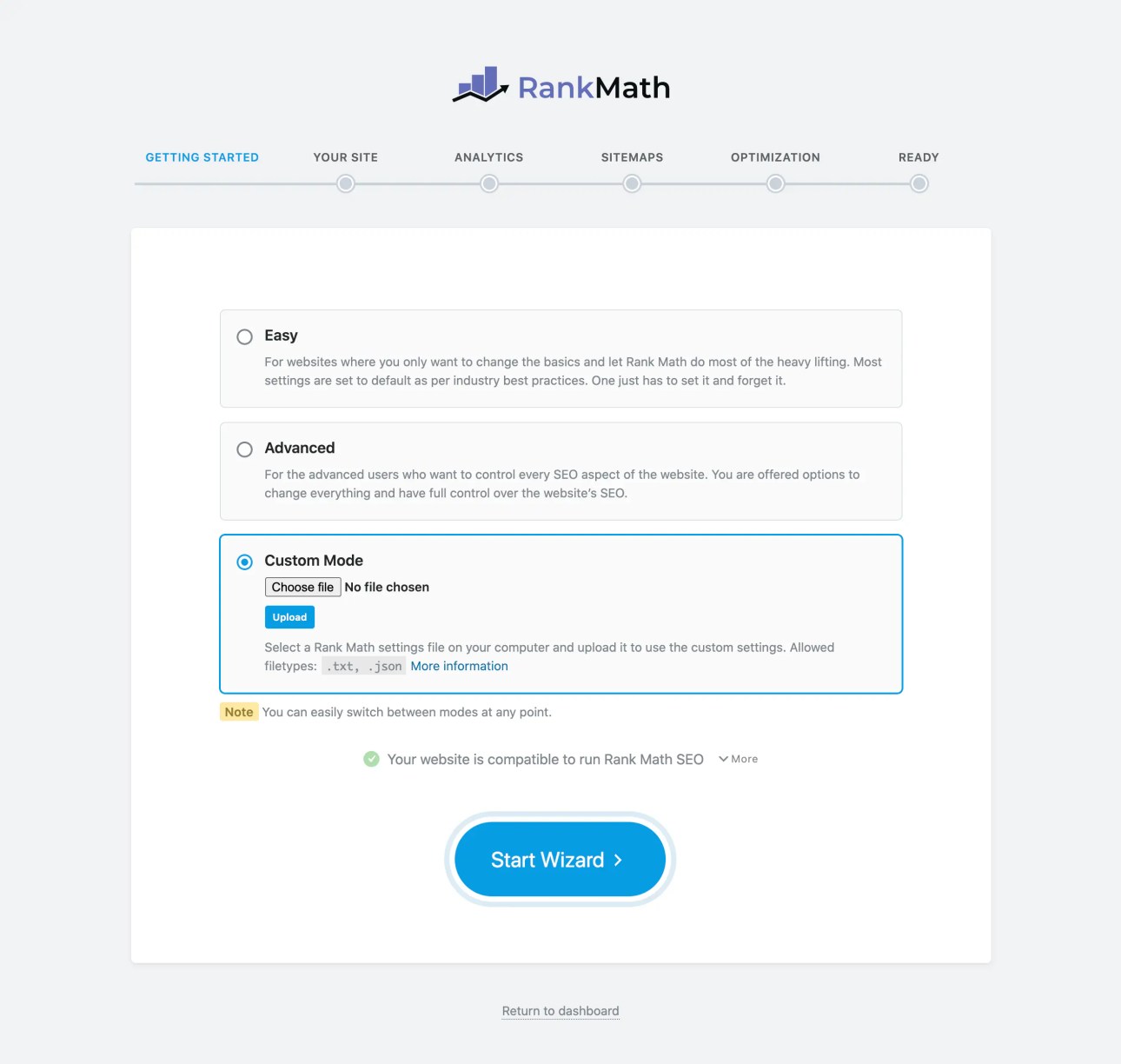
Step 4: When prompted, choose to import data from Yoast. This transfers your SEO titles, meta descriptions, and redirects automatically.

Step 5: Configure your settings. Enable only the modules you need to keep things lightweight.

Step 6: Delete Yoast SEO from your plugins list.
Step 7: Fine-tune your setup. Check that breadcrumbs are working. Fill in your social profile URLs in Rank Math settings. Review which modules are active.
The entire process takes about 20-30 minutes. No rankings were harmed in the making of this switch.
FAQs – Rank Math vs Yoast
Conclusion
So, Rank Math vs Yoast. Which one wins? For most WordPress users in 2026, Rank Math is the better choice. More features, lower price, and a free plan that beats Yoast’s paid tier in several areas. That’s hard to argue with.
If you’re still on Yoast free, switch to Rank Math free today. It’s a no-risk move with zero cost and real benefits.
If you’re paying for Yoast Premium, that $89/year is better spent on Rank Math Pro. You get more features, better analytics, and a plugin that doesn’t slow your site down.
Remember — green lights don’t guarantee rankings. The right plugin gives you a solid foundation. What you build on that foundation is what actually moves the needle.
My recommendation? Start with Rank Math Free if you have any SEO experience at all. Upgrade to Rank Math Pro if you run a WooCommerce store or manage multiple sites.
The best SEO plugin is the one you actually use consistently. Pick one, learn it deeply, and focus on creating great content. That’s what actually moves the needle in 2026.
Have you already made the switch? Or are you still on Yoast? Drop your experience in the comments — I’d love to hear how it went for you.


