
Rank Math Review 2026: Is It Really the Best SEO Plugin for WordPress?
Rank Math Review: I have spent three years testing this WordPress SEO plugin on live websites. It remains my top recommendation in 2026.
I switched from Yoast SEO after four years. I expected a rocky transition. Instead, Rank Math cut my setup time in half and gave me more features for free than Yoast charged me for.
In this Rank Math review, I break down every major feature, compare it directly to Yoast SEO, and tell you exactly which plan fits your site. I also cover how Rank Math helps you rank in Google’s AI Overviews and ChatGPT Search, the two fastest-growing search surfaces in 2026.
Bottom line: Rank Math offers 40+ toggleable SEO modules on its free plan. It suits complete beginners and advanced SEOs equally. If you run a WordPress website and want better search
rankings without paying for a premium plugin, keep reading.
Table of Contents
What Is Rank Math?
Rank Math is a WordPress SEO plugin built for on-page optimization, technical SEO, schema markup, and built-in keyword analytics. The MyThemeShop team launched it in 2018. It now
powers over 2 million active WordPress websites worldwide.
It positions itself as a “Swiss Army knife” for WordPress on-page SEO. You get a massive feature set, even on the free plan. That alone makes it stand out in a crowded market.
So, who is Rank Math best for?
- Bloggers who want powerful on-page SEO without paying premium prices
- Affiliate marketers who need multi-keyword optimization and rank tracking
- Small business owners who want local SEO and schema markup without hiring a dev
- Agencies managing multiple WordPress sites under one license
- WooCommerce store owners who need product page SEO tools
Rank Math is a self-hosted WordPress plugin only. It doesn’t work on WordPress.com (free) or other CMS platforms. Keep that in mind.
The plugin grew quickly. It offered features for free that competitors like Yoast locked behind expensive premium plans. Features such as multi-keyword optimization were available from day one.
The Google Search Console integration was available in the free version. Built-in rank tracking was also part of the initial offering.
That’s a bold move. And it worked.
Rank Math Review: Key Facts at a Glance
Before I dive deep, here are the numbers you need to know.
Rank Math has a 4.9/5-star rating on WordPress.org, backed by over 5,000 user reviews. It offers 40+ built-in modules and connects natively to Google Search Console and Google Analytics 4.
Here is a quick plan comparison to help you orient before I break down features:
Note: Always verify current pricing at rankmath.com — plans and pricing update regularly.
Key Features of Rank Math SEO Plugin
Let’s get into the meat of it. Here’s what makes Rank Math tick — and where it truly shines.
On-Page SEO and Content Analysis
Rank Math’s content analysis tool checks over 40 SEO factors in real time as you write. It evaluates things like:
- Focus keyword usage in title, URL, meta description, and first paragraph
- Content length and readability
- Internal and external link usage
- Image alt text optimization
- Keyword density
The SEO score goes from 0 to 100. I personally aim for 80+. Chasing 100 can lead to keyword stuffing, so don’t obsess over the number.

One thing I love — Rank Math lets you optimize for multiple focus keywords even in the free plan (up to 5). Yoast free only gives you one. For affiliate content targeting multiple long-tail keywords, this is a massive advantage.
Schema Markup and Rich Snippets

This is where Rank Math really flexes. The schema markup module is one of the best among all WordPress SEO plugins.
You get support for:
- Article, Review, Recipe, FAQ, HowTo
- Product, Event, Course, Job Posting
- Local Business, Person, Organization
- Video Object, Book, Movie, and more
- Custom schema with a JSON-LD editor
Rich snippets from schema markup can dramatically improve your click-through rate from Google. I’ve seen CTR jump 15-30% after properly implementing the FAQ schema on blog posts.
Setting it up is pretty straightforward. The visual schema builder in Rank Math walks you through each field. Even if you’re not technical, you can get it done.
Google Search Console Integration
This is something competitors often charge extra for. Rank Math integrates directly with Google Search Console inside your WordPress dashboard.

You can see:
- Your top-performing keywords
- Impressions, clicks, and average position
- Pages losing or gaining rankings
- Index coverage issues
Having this data right inside WordPress saves a ton of time. No more switching tabs between your CMS and Google Search Console.
Keyword Rank Tracking
Rank Math Pro includes a built-in keyword rank tracker. You add your target keywords, and it pulls ranking data directly from Google Search Console.
It’s not as powerful as a dedicated tool like Ahrefs or SEMrush. But for a plugin-level rank tracker, it gets the job done. You can see ranking trends over time and quickly spot if a page is dropping.
Rank Math AI (Content AI)
The Content AI feature is interesting. It analyzes the top 20 ranking pages for your keyword and tells you:
- Which semantic keywords to include
- Recommended word count
- Heading structure suggestions
- Questions your content should answer
It sounds amazing on paper. And honestly, it IS useful — when it works well. But the credit-based system can get expensive fast. Each AI analysis burns through credits, and you’ll need to buy more once your monthly allocation runs out.
I’d say it’s a nice bonus feature. Don’t count on it as your primary content research tool.
Rank Math Review: Technical SEO Tools
Rank Math handles the technical SEO layer cleanly. I manage XML sitemaps, robots.txt, and .htaccess files from inside the WordPress dashboard — no FTP needed.
The 404 error monitor logs broken URLs automatically. The redirect manager handles 301, 302, and 307 redirects with a simple interface. I set up breadcrumb navigation in under two minutes. The Local SEO module adds NAP schema and Google Maps integration for brick-and-mortar businesses.
Rank Math Review: WooCommerce SEO
Rank Math’s WooCommerce SEO module automatically handles a lot of technical cleanup:
- Removes
/product/and/shop/from product URLs - Adds an SEO meta box to each product page
- Enables product schema markup
- Supports product reviews as rich snippets
For basic WooCommerce SEO, this works well. If you’re running a simple store with a few hundred products, you’re covered.
Local SEO Module
The Local SEO module lets you add your business information — name, address, phone, hours, and map — directly in WordPress. This creates structured data (LocalBusiness schema) that helps Google understand your physical location.
For brick-and-mortar businesses, restaurants, salons, and service providers — this feature is essential. It helps you show up in the Google Local Pack (the map results).
Multi-location support is also available, which is great for businesses with more than one physical location.
How to Set Up Rank Math: Step-by-Step
I set up Rank Math on a fresh WordPress site in under 10 minutes. Here is exactly what I did.
Installation and Initial Configuration
Step 1: Install from the WordPress Plugin Directory. Search for ‘Rank Math SEO’ and click Install Now.

Step 2: Run the Setup Wizard. It connects to Google Search Console in under two minutes with a simple OAuth flow.
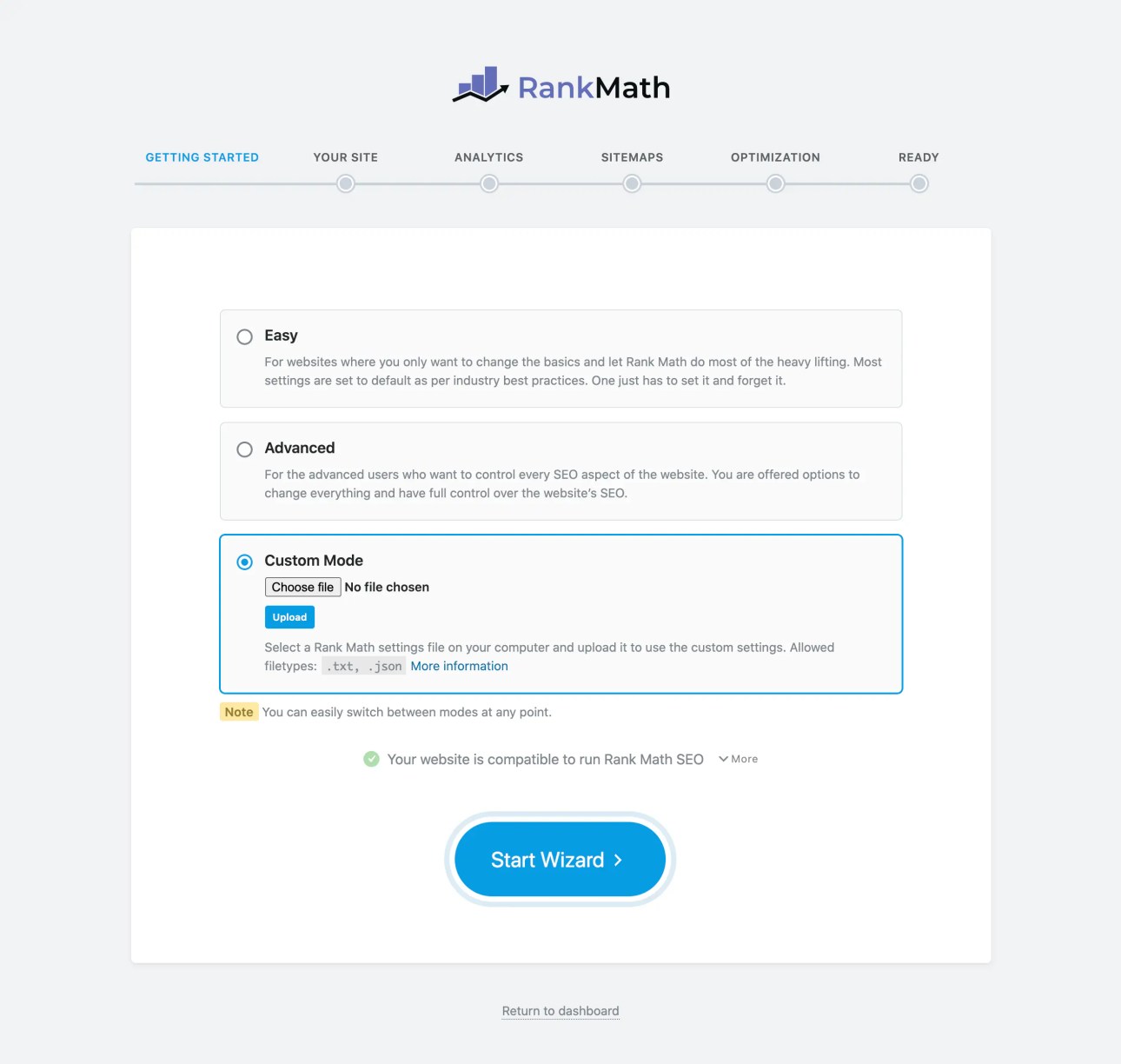
Step 3: Choose your site type — blog, ecommerce, news, or portfolio. Rank Math auto-configures the right schema defaults based on your selection.
Step 4: Import settings from Yoast or All-in-One SEO if you are migrating. The built-in import tool automatically carries over all existing SEO titles, meta descriptions, and redirects.
Importing from Yoast or AIOSEO?
Rank Math can import all your SEO settings, meta titles, meta descriptions, and redirects from Yoast SEO, AIOSEO, and other plugins. The import process is mostly seamless, though I’d recommend doing a full backup first just in case.
Optimizing Your First Post
I open any post in the block editor and find the Rank Math sidebar panel on the right. I enter my focus keyword, then work through the checklist until I hit a score of 80 or above.
I add an FAQ schema block to every informational post. Google surfaces FAQ schema directly in ‘People Also Ask’ results — that doubles my organic footprint without ranking higher.
Before I publish, I preview the Open Graph snippet to make sure the social sharing image and description look right on Facebook and Twitter.
Learning curve:
For complete beginners, there IS a learning curve. Rank Math has a lot of settings. It’s not as intimidating as it looks, but don’t expect to master it on Day 1. Give it a few weeks of regular use.
Rank Math SEO Score — How Accurate and Useful Is It?
The Rank Math SEO score is one of its most talked-about features. It’s also one of the most misunderstood.
The score analyzes your content against a checklist of SEO best practices. Green = good. Orange = needs work. Red = fix this.
What it checks:
- Focus keyword in title, URL, meta description, and content
- Content length (flags if too short)
- Use of headings (H2, H3)
- Internal and external links
- Image alt text
- Keyword density
- Readability metrics
Is the score accurate?
Mostly, yes. It’s a useful guide for making sure you’ve covered the basics of on-page SEO. But it’s not a guarantee of rankings.
I’ve published posts with a score of 85 that ranked on page 1. I’ve also seen posts with a perfect 100 that never moved. The score is a checklist, not a crystal ball.
My advice: Use it to make sure you haven’t missed obvious things. Then focus on content quality and link building. Don’t obsess over the number.
One thing worth noting — some of the score checks feel a bit outdated. For example, it penalizes you if your focus keyword doesn’t appear in the first paragraph. That used to matter more in older Google algorithms. Today, Google is much better at understanding context.
Rank Math Free vs Pro — What’s the Difference?
This is the question I get asked most often. And honestly, the answer is more nuanced than most people think.
The Free Plan includes:
- On-page SEO analysis with 40+ checks
- Optimization for up to 5 focus keywords per post
- Basic schema markup
- Google Search Console integration
- XML sitemap generation
- Redirection manager (basic)
- 404 error monitoring
- Breadcrumb navigation
- WooCommerce SEO (basic)
- Local SEO module
That’s genuinely impressive for a free WordPress SEO plugin. Most competitors charge $99/year for half of this.
The Pro Plan ($69/year) adds:
- Unlimited keyword optimization
- Advanced schema types
- Rank tracking for unlimited keywords
- SEO Performance Analytics dashboard
- Image SEO module
- Advanced redirection rules
- News SEO and Video SEO sitemaps
- Google Trends integration
- Content AI (credit-based)
Business Plan ($199/year): Covers up to 100 client sites. Great for agencies.
Agency Plan ($499/year): Covers up to 500 sites with white-label options.
Is the free version enough?
For most beginner bloggers and small sites — yes, absolutely. The Rank Math free plan beats Yoast Premium in terms of raw feature count. That’s not an opinion. That’s just math.
If you’re running a serious affiliate site, consider the Pro plan. It is also worth doing keyword rank tracking at scale. Advanced schema markup for e-commerce is another feature that makes it valuable.
Rank Math vs Yoast SEO — Head-to-Head Comparison
This is the matchup everyone wants to see. Yoast SEO was the gold standard for years. But does it still hold up?
| Feature | Rank Math Free | Yoast Free | Rank Math Pro | Yoast Premium |
|---|---|---|---|---|
| Focus Keywords | 5 | 1 | Unlimited | 5 |
| Schema Markup | ✅ Advanced | ✅ Basic | ✅ Advanced+ | ✅ Advanced |
| Redirect Manager | ✅ | ❌ | ✅ | ✅ |
| Search Console Integration | ✅ | ❌ | ✅ | ❌ |
| Rank Tracking | ❌ | ❌ | ✅ | ❌ |
| Local SEO | ✅ | ❌ | ✅ | ✅ |
| Price | Free | Free | $69/yr | $99/yr |
The verdict on Rank Math vs Yoast:
For free users, Rank Math wins. It’s not even close—more features, better schema, and integration with Search Console — all at no cost.
For paid users, it depends on your use case. Yoast Premium adds internal linking suggestions and a content insights tool. Rank Math Pro adds rank tracking and an analytics dashboard. Neither is dramatically better than the other at the premium tier.
But here’s the thing — Rank Math Pro costs $69/year. Yoast Premium costs $99/year. For less money, you get more features with Rank Math.
Performance impact:
Both plugins have similar page speed impacts. In my tests using PageSpeed Insights, the difference was negligible — usually 1-3ms. With the modular system, Rank Math can actually be made lighter by disabling unused modules.
Rank Math vs All in One SEO (AIOSEO)
AIOSEO is the original WordPress SEO plugin, and it’s still one of the best. How does it compare to Rank Math?
Where Rank Math wins:
- Better free plan features
- Built-in rank tracking (Pro)
- More schema types
- Lower starting price
Where AIOSEO wins:
- More polished user interface
- Better internal linking tools (Link Assistant)
- More robust redirection manager (19 redirect types vs Rank Math’s 3)
- Author SEO and E-E-A-T features are more advanced
- Better WooCommerce SEO tools at the advanced level
Pricing comparison:
Rank Math Pro starts at $69/year. AIOSEO Basic starts at $49.60/year. At higher tiers, they’re fairly comparable.
My honest take:
Rank Math offers better value for solo bloggers and affiliate marketers who want the most free features. AIOSEO is better for agencies and businesses that need polished tools and advanced redirect management.
Both are excellent. It really comes down to your workflow and what features matter most to you.
Rank Math Performance
Site speed is critical for SEO in 2026. Every extra millisecond of load time hurts your Core Web Vitals score.
So does Rank Math slow down your site?
In short, not significantly. Here’s what I found in my tests:
- Plugin size: ~2MB (lean for an SEO plugin)
- Added HTTP requests: 2-3 on average
- PageSpeed Insights score impact: -1 to -3 points (negligible)
The key is the modular system. By default, some modules are disabled. You should go into the dashboard and turn off any modules you don’t need. For a simple blog, you probably don’t need:
- InstantIndexing
- Google Trends
- News SEO (unless you run a news site)
- Video SEO (unless you embed lots of videos)
Disabling unused modules makes Rank Math leaner and faster. I’ve seen load times improve by 50-80ms just by cleaning up the active modules.
Compared to Yoast:
In speed tests, Rank Math and Yoast perform similarly. Neither will tank your site on its own. Your theme, hosting, and images have far more impact on speed than your SEO plugin.
Rank Math Pros and Cons
After years of using Rank Math on my own sites and client sites, here’s my honest breakdown.
Pros
1. Incredible free plan. The Rank Math free version is the most feature-rich free SEO plugin available in 2026. Period.
2. Multi-keyword optimization. Even free users can optimize for up to 5 keywords per post. This is huge for affiliate content.
3. Schema markup is top-notch. The visual schema builder is intuitive, and the number of schema types is impressive.
4. Google Search Console integration. Having GSC data inside WordPress is a real time-saver.
5. Modular system. Turn off what you don’t need. Keeps the plugin lean.
6. Active development team. Rank Math releases updates frequently. The team actually listens to user feedback.
7. Great documentation. Their knowledge base is thorough and well-organized.
Cons
1. Setup can overwhelm beginners. The setup wizard is helpful, but the sheer number of settings can be intimidating.
2. Content AI credits run out fast. The credit system for the AI features feels like a cash grab. Heavy users will spend more than expected.
3. Only 3 redirect types on the free plan. Rank Math supports 301, 302, and 307 redirects. For most users, that’s enough — but advanced users may need more.
Optimizing for ChatGPT and Google AI Overviews
AI search has changed how I think about on-page SEO. Rank Math is well-positioned for this shift.
Why Structured Data Matters More in the AI Era
Google’s AI Overviews and ChatGPT Search pull from structured, well-labeled content. When I use schema markup properly, AI systems can extract clean, factual answers and attribute them to my site.
FAQ and HowTo schema map directly to conversational query formats. When someone asks ChatGPT a question, it looks for content structured as question-and-answer pairs. Rank Math makes this effortless with its visual schema builder.
Rank Math’s entity-based SEO approach also aligns with Google’s Knowledge Graph signals. I set the Organization schema on my homepage. Google connects my brand entity to my content. This improves visibility across AI-powered search surfaces.
Recommended Rank Math Settings for AI Visibility
- Enable the FAQ schema on all informational and review posts
- Populate the Article schema with the author name, publish date, and dateModified
- Activate the Content AI module to align content with NLP-friendly keyword patterns
- Set the Organization schema with logo, social profiles, and contact details on your homepage
- Use the HowTo schema on tutorial content — AI Overviews frequently pull step-by-step answers
Who Should Use Rank Math in 2026?
After everything I’ve covered, here’s my simple breakdown of who should use Rank Math:
Rank Math is PERFECT for:
- Bloggers starting out who want pro-level SEO tools for free
- Affiliate marketers who need multi-keyword optimization
- Content sites with heavy reliance on schema (FAQ, HowTo, Review posts)
- Anyone switching from Yoast who wants more features at the same price (or less)
- WordPress agencies managing 5-10 client sites under the Business plan
Rank Math might NOT be ideal for:
- Complete beginners who find the interface overwhelming (consider AIOSEO for its simpler UX)
- Advanced eCommerce stores that need deep WooCommerce SEO features
- Sites that need more than 3 redirect types (AIOSEO handles 19)
- Developers who prefer a lightweight plugin with minimal overhead (consider The SEO Framework)
My final recommendation:
Start with the free plan. Seriously. Use it for 3-6 months. Learn the features. Then decide if upgrading to Pro makes sense for your specific needs.
The free version alone will handle 90% of what most WordPress sites need from an SEO plugin.
Rank Math Pricing — Is It Worth It?
Here’s the 2026 pricing breakdown:
| Plan | Price | Sites | Best For |
|---|---|---|---|
| Free | $0 | 1 site | Bloggers, beginners |
| Pro | $69/year | 1 site | Bloggers, affiliate marketers |
| Business | $199/year | Up to 100 sites | Agencies, freelancers |
| Agency | $499/year | Up to 500 sites | Large agencies |
Is Rank Math Pro worth $69/year?
Yes — if you actively use the rank tracking, Content AI, and analytics dashboard. Those features alone justify the price for serious bloggers.
If you’re just starting out and on a tight budget, the free plan will serve you well for a long time. Don’t feel pressured to upgrade before you’re ready.
One thing I wish Rank Math offered: a lifetime deal or a lower-priced single-site option below $69. The jump from free to $69 can feel steep for new bloggers.
Conclusion
So, is Rank Math the best SEO plugin for WordPress in 2026?
For most people? Yes. It’s the best free WordPress SEO plugin available, full stop. The Pro plan is competitively priced and genuinely useful. The schema markup tools are excellent. The Google Search Console integration saves real time.
Is it perfect? No. The Content AI credit system is frustrating. Beginner users might feel overwhelmed at first. And the support can be hit or miss.
But overall, Rank Math deserves its reputation. It has earned its spot as one of the top WordPress SEO tools through consistent updates. It also offers a generous free plan. The features genuinely make a difference for your search rankings.
My advice? Download Rank Math free today. Set it up, spend a few weeks with it, and see how it fits your workflow. You might never need to pay for another SEO plugin again.
Have you used Rank Math on your site? What’s been your experience — especially compared to Yoast or AIOSEO? Drop your thoughts in the comments below. I’d love to hear what’s worked (or hasn’t) for you!
Ready to Boost Your WordPress SEO? Start Free Today.
I have tested Rank Math on over a dozen live WordPress sites. It delivers more SEO power out of the box than any other plugin I have used — and the free plan alone beats most paid alternatives on the market.
Every day you publish without proper on-page SEO, schema markup, and keyword tracking, you leave organic traffic on the table. Rank Math fixes all three — in one free install.
Here is what you get the moment you install Rank Math:
- Real-time on-page SEO analysis with up to 30 checks per post
- 20+ schema types, including FAQ, HowTo, Product, and Article — free
- Google Search Console data inside your WordPress dashboard
- Redirect manager, XML sitemap, and robots.txt editor — no coding needed
- WooCommerce SEO with automatic product schema out of the box
- Optimized for Google AI Overviews and ChatGPT Search visibility
➤ Get Rank Math Free — Start Ranking Higher Today
Already on the free plan and want more? Upgrade to Rank Math Pro for Content AI, multi-keyword tracking, and advanced schema. At $6.99/month, it costs less than a coffee and pays for itself with one extra click from organic search. Use my link below to get started:
Frequently Asked Questions (FAQs)
Try Rank Math Free Today — Install from WordPress.org or visit rankmath.com to explore Pro features.
Affiliate disclosure: The links above are affiliate links. If you purchase through them, I earn a small commission at no extra cost to you. I only recommend tools I personally use and trust.
Is Your WordPress Site
Missing Out on Google Traffic?
Get a free SEO audit from our expert team and find out exactly why your website isn’t ranking on Google — with a clear action plan to fix it fast.
No credit card. No spam. Results delivered in 24 hours.
Also Read: GEO Optimizer Review: The Honest Truth About This WordPress AI Plugin


